

We're excited to announce Devtron 2.0, a major release that consolidates all your Kubernetes operations into a single platform. This version introduces a completely reimagined platform experience with improved navigation, native cost visibility, and data protection management. The release focuses on three core areas: operational efficiency through centralized dashboards, financial control with built-in cost visibility, and reliability through data protection management capabilities. Devtron 2.0 consolidates essential Kubernetes management workflows into a unified platform designed for production environments.
Here's the TL;DR
- Reimagined platform UI: Platform capabilities organized into logical modules to improve discoverability and navigation.
- Kubernetes cost analytics: Track cluster spending, identify cost drivers, and optimize resource allocation.
- Backup and restore: Automated data protection with configurable backup schedules and point-in-time recovery.
- Centralized overview dashboards: Unified dashboards providing complete visibility across the platform.
- Command Bar (Ctrl + K): Quickly navigate across the platform and jump to recently visited resources.
What’s New
Reimagined Platform UI
We have reorganized the platform UI that consolidates capabilities into eight logical modules. This restructuring improves feature discoverability and reduces navigation complexity across the platform.
- With the Application Management module, deploy and manage applications, configure application groups, apply bulk edits, create templates, and enforce deployment policies.
- The Infrastructure Management module provides access to applications deployed through Helm, Argo CD, and Flux CD, along with a chart store, resource browser, and resource watcher.
- The Software Release Management module orchestrates releases through Release Hub and configures multi-tenant deployments.
- With the Cost Visibility module, analyze spending by cluster, environment, project, and application with configurable cost allocation rules.
- The Security Centre module enables review of vulnerability reports, security scanning, and security policy management.
- With the Automation Enablement module, configure and schedule job orchestration for automated workflows.
- With the Data Protection Management module, configure backup schedules, restore applications, and manage backup storage locations.
- With the Global Configuration module, configure SSO, manage clusters and environments, register container registries, and define authorization policies.
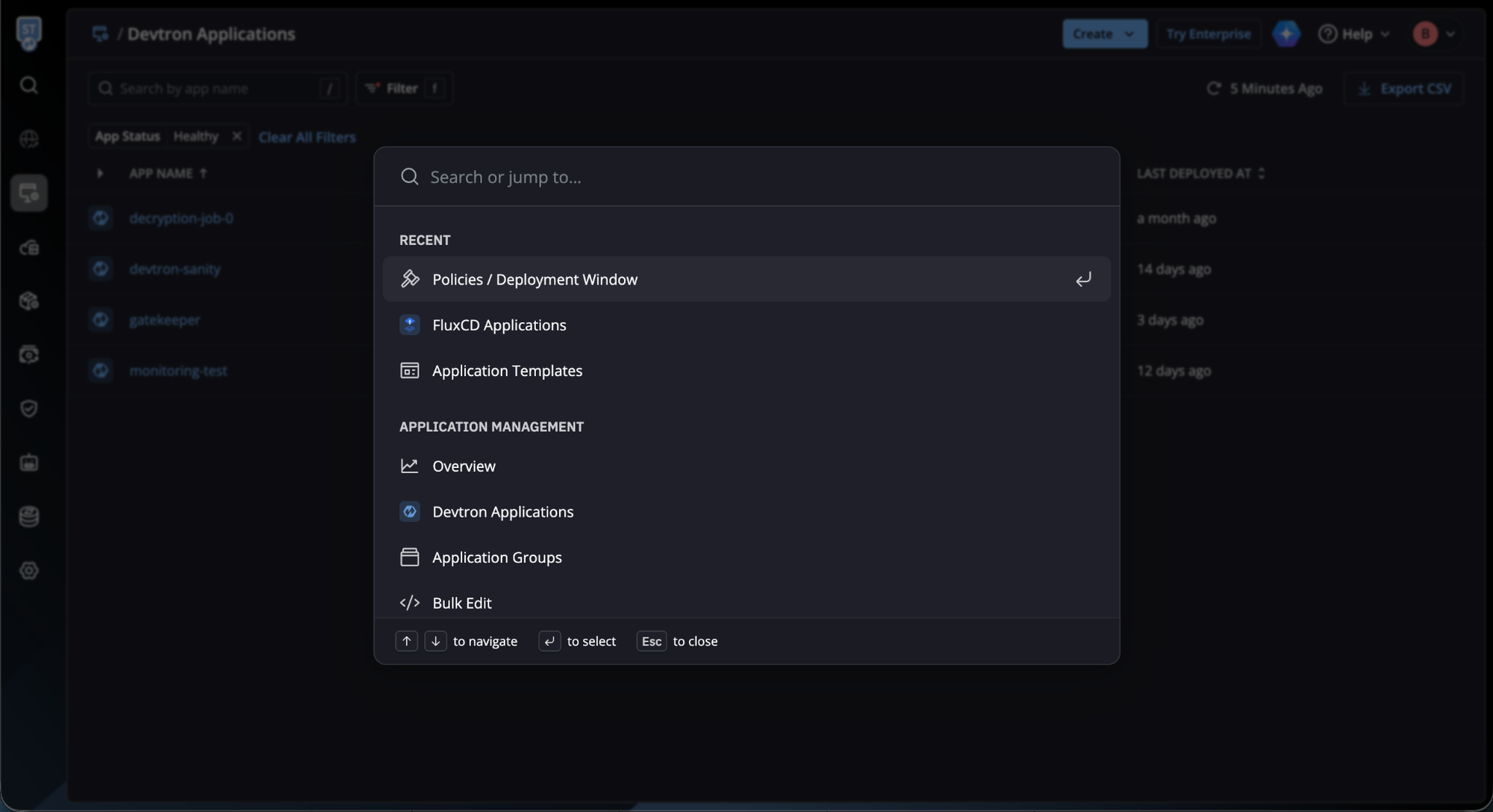
Command Bar for Faster Navigation
We’ve introduced a Command Bar (Ctrl + K) to make navigation faster and more intuitive. Quickly jump to any target across the platform, and access a list of recently visited items for instant navigation, reducing clicks and saving time as you move between workflows.
Get a Centralised View with Overview Dashboards
We have now added centralised overview dashboards for applications, infrastructure, cost visibility, and security.
- The Applications Overview displays application health metrics and CI/CD pipeline activity, helping teams understand delivery performance at a glance.
- The Infrastructure Overview shows cluster utilization and resource allocation, enabling better visibility into Kubernetes capacity and usage.
- The Cost Visibility overview presents cost trends and spending patterns across environments, making it easier to track and analyze infrastructure spend.
- The Security Overview provides an aggregated view of your security posture, helping teams identify risks and monitor security status more effectively.
- The Data Protection overview helps you quickly see the current state of backups and restores across your clusters. From one place, you can check backup health, restore activity, schedules, and storage status.
Track and Optimize your Kubernetes Cost
We have added an native cost observability for Kubernetes infrastructure, providing granular visibility into resource consumption and spending patterns across clusters. The Cost Visibility module enables teams to track and analyze costs associated with CPU, memory, GPU, storage, and total workload expenses.
The module provides cost breakdowns across multiple dimensions:
- Cluster-level analysis - View total spending per cluster with resource-specific breakdowns
- Namespace and workload filtering - Drill down into costs by namespace, deployment, statefulset, or daemonset
- Label-based attribution - Track costs using Kubernetes labels for team, project, or cost center allocation
- Time-range reporting - Analyze spending trends across custom date ranges
Cost data helps engineering teams identify resource-intensive workloads, FinOps teams attribute expenses accurately, and leadership teams make informed decisions on infrastructure optimization.
Data Protection Management (Backup and Restore)
We have added native backup and restore capabilities for Kubernetes applications, enabling data protection and disaster recovery operations directly from the platform UI. Users can create manual backups, execute backups from existing schedules, or configure recurring backups using cron-based schedules. The Data Protection Management module supports multiple backup locations including object storage providers such as AWS S3, and allows configuration of volume snapshot locations for persistent volumes.